Invoicing Software for Contractors
Create an invoice, send a payment link, and get paid — without chasing anyone down. Built for HVAC, plumbing, electrical, and landscaping teams.
No credit card required
Features
What invoicing software for contractors actually does
Invoice creation
Build invoices from job records or from scratch. Add line items for parts, labor, and services. Apply discounts and tax. Send in seconds.
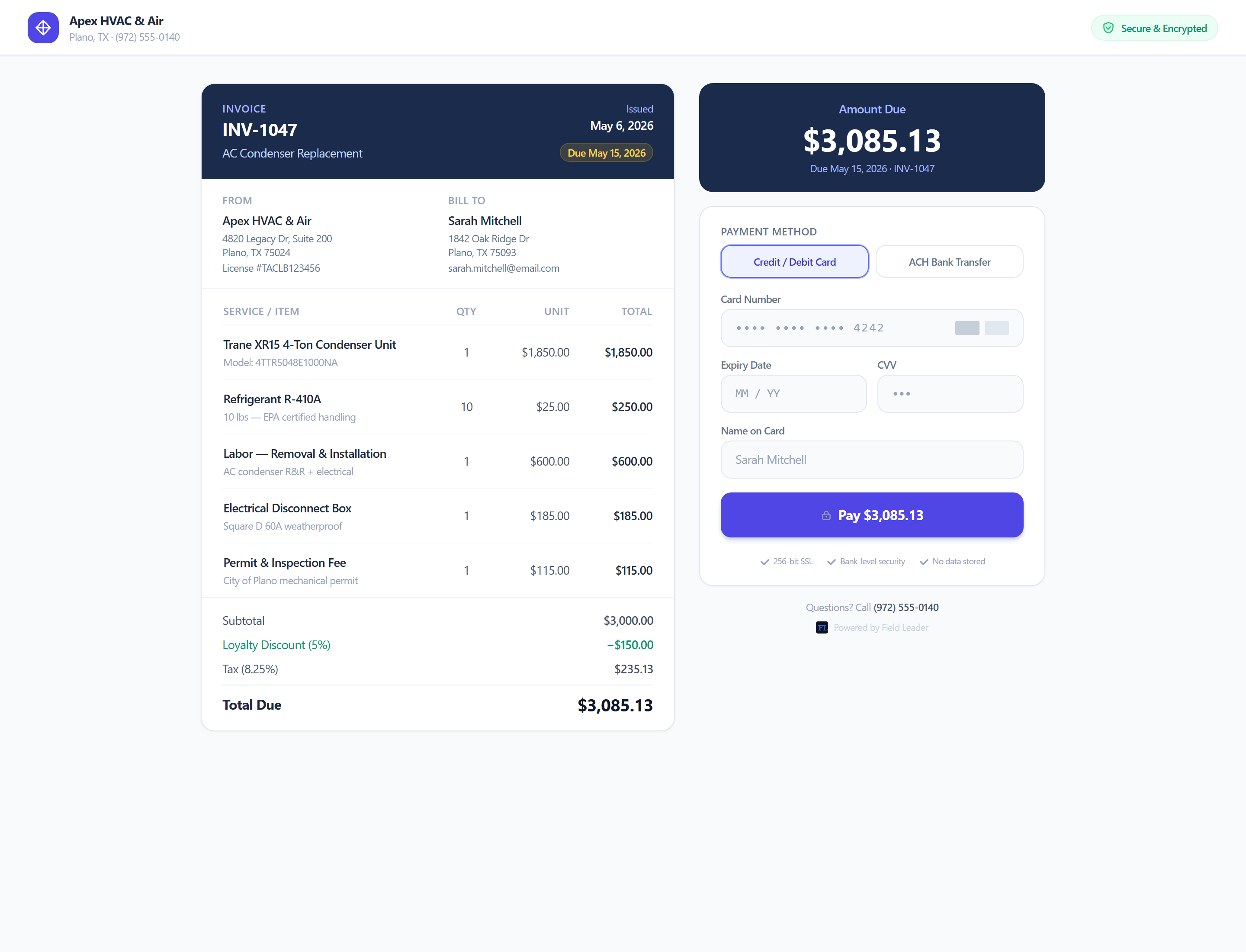
Public payment links
Every invoice gets a unique, mobile-optimized payment page. Send the link via text or email. No account or app required for your customer.
Stripe checkout
Payments are processed through Stripe. Customers can pay with a card or Apple Pay. Funds go directly to your connected Stripe account.
Partial payments
Customers can pay a deposit or split the balance. The invoice tracks what's been collected and shows the remaining amount due at all times.
How It Works
From start to finish
Create the invoice
Generate an invoice from your job record. Line items, labor, parts, tax — it's all there.
Send the payment link
Copy the unique payment link and send it to your customer via text or email. No attachments, no portals, no login required on their end.
Customer pays from their phone
They open the link, see the invoice, and pay with a card or Apple Pay — directly from any phone or browser in under 60 seconds.
Invoice marked Paid automatically
The moment payment clears, the invoice status updates to Paid. No manual entry. You see it in your dashboard right away.
Related Features
Estimates & Quotes Software for Contractors
Build a professional quote in seconds, track when it's viewed, and convert it to a live invoice the moment your customer approves.
Dispatch Software for Service Businesses
Schedule jobs, assign technicians, and track every visit from a single calendar — no group texts, no missed calls, no spreadsheets.
Customer Portal for Service Businesses
Customers view quotes, approve work, track their technician live, and pay invoices — all from a secure link on their phone. No account required.
Built For These Industries
HVAC Software for Heating & Cooling Companies
Schedule tune-ups, track maintenance contracts, and get paid for emergency calls the same day.
Plumbing Software for Service & Repair Companies
Dispatch fast on emergency calls and invoice on-site from your phone before you leave the job.
Electrical Contractor Software
Quote the job, get approval, do the work, collect payment — all in the same system.
Landscaping Software for Lawn Care Companies
Keep track of every property, automatically schedule recurring services, dispatch crews, send invoices, and get paid — without the paperwork.
FAQ
Common questions about invoicing software for contractors
Ready to get started?
Create an invoice, send a payment link, and get paid — without chasing anyone down. Built for HVAC, plumbing, electrical, and landscaping teams.
Start FreeNo credit card required